Embedding Overview
supernova's embedding pipeline streams data from a source, embeds text with configurable dense and/or sparse models, and writes the results as parquet files to S3 or HuggingFace Hub.
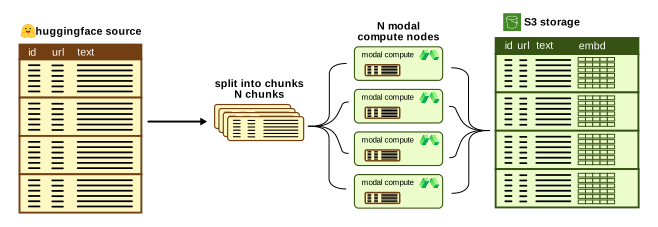
Configuration
Embedding configs live in configs/embedder/ and have four sections:
source:
  type: huggingface
  dataset_name: nick007x/arxiv-papers
  split: train
  text_field: abstract             # single field to embed
  # text_template: "{title}: {abstract}"  # or a format string

dense_embedder:
  type: sentence_transformer       # or openai
  model: Alibaba-NLP/gte-multilingual-base
  trust_remote_code: true
  batch_size: 64
  dtype: bfloat16

pipeline:
  chunk_size: 100000               # records per batch
  num_workers: 2                   # async workers (local mode)
  flush_threshold: 100000          # records before writing parquet

storage:
  type: s3                         # s3, hf, or local
  bucket: my-bucket
  prefix: arxiv-papers/gte-multilingual-base
  output_dir: /tmp/supernova
You must specify at least one of dense_embedder or sparse_embedder. See Dense Embedders and Sparse Embedders for details.
Column naming
The embedding columns default to dense_embedding, sparse_embedding, and multivector_embedding. Override with:
pipeline:
  dense_embedding_column: my_dense              # default: dense_embedding
  sparse_embedding_column: my_sparse            # default: sparse_embedding
  multivector_embedding_column: my_multivector  # default: multivector_embedding
  rendered_text_column: text                    # default: text
The rendered_text_column setting controls where the template-rendered text lands. If your source already has a text field it gets shadowed — set rendered_text_column: rendered_text to keep both.
Sources
HuggingFace
Streams from any HuggingFace dataset:
source:
  type: huggingface
  dataset_name: mteb/tweet_sentiment_extraction
  split: train
  text_field: text
Text extraction -- two options:
text_field: abstract-- use a single columntext_template: "{title}: {abstract}"-- format string combining multiple columns
Text splitting -- if a text exceeds the embedder's max token limit, it's automatically split using the embedder's native tokenizer. Each piece becomes a separate record with an incrementing chunk_index.
Storage backends
S3
Each chunk produces one parquet file, uploaded as batch_00000000.parquet, batch_00000001.parquet, etc. Auto-creates the bucket if it doesn't exist.
HuggingFace Hub
Local
Output format
Every parquet file has a flat schema. Three groups of columns:
Always present:
| Column | Type | Description |
|---|---|---|
text |
string | The text that was sent to the embedder (template-rendered). Configurable via pipeline.rendered_text_column. |
Embedding columns — written only when the corresponding embedder is configured. Names default as below; override via pipeline.dense_embedding_column / pipeline.sparse_embedding_column / pipeline.multivector_embedding_column.
| Column | Type | Description |
|---|---|---|
dense_embedding |
list<float32> |
Dense embedding |
sparse_embedding |
struct{indices: list<uint32>, values: list<float32>} |
Sparse embedding |
multivector_embedding |
list<list<float32>> |
Multi-vector embedding (N vectors per row) |
Pass-through source columns — every column from the source row (after source.exclude_columns filtering) is appended verbatim under its original name. The writer skips any source column whose name collides with the embedding columns or with rendered_text_column. Types are inferred from the data by pyarrow.
So if your HuggingFace source has columns title, abstract, author, those land alongside the embedding columns:
SELECT title, length(dense_embedding) AS dim
FROM read_parquet('s3://my-bucket/dataset/model/**/*.parquet')
LIMIT 10;
Unique row IDs are derived deterministically at load time from (parquet_file_path, file_row_number) using vf_point_id — see Loader Architecture. The embed-side parquets do not carry an explicit row_id column; identity is anchored to physical row position so a re-read of the same parquet always produces the same IDs.
Running locally
The local runner uses async workers with a priority queue buffer to ensure ordered output. Good for development and small datasets.